

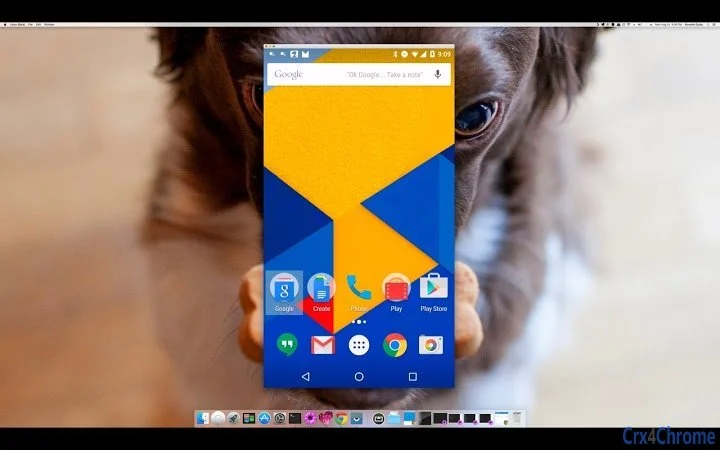
Description
Download Vysor – Chrome Apps, Android, Screen Mirroring, USB, Wireless, Control, Free
Overview
Vysor is a desktop utility designed to enable seamless screen mirroring and remote control of Android devices directly from a computer. The software allows users to view and interact with their Android phone or tablet on a larger screen, offering a practical solution for developers, testers, content creators, and everyday users who need to manage mobile content more efficiently. It supports both wired (USB) and wireless connections, making it adaptable to various workflows. The tool is particularly useful for tasks such as debugging mobile applications, demonstrating app features, managing notifications, or simply controlling a smartphone from a desktop environment.
Target users include professionals working with Android development or testing, educators demonstrating mobile apps, and consumers who want to use their phone’s interface on a computer. While the developer information is not publicly available, the software has evolved through multiple updates with a focus on stability, performance, and feature expansion. Real-world usage scenarios include using Vysor during presentations, troubleshooting mobile app issues, or controlling a device remotely while working at a desk.
The software’s functionality is centered around Android device integration with desktop systems, leveraging the Android Debug Bridge (ADB) for connectivity. It provides a straightforward interface for managing connected devices and offers tools for customization, including display settings, input controls, and connection preferences. The developer did not provide additional system requirements or detailed background information.
Key Features & Capabilities
- Screen Mirroring – Displays real-time video feed from an Android device on the computer screen, supporting both USB and wireless connections.
- Remote Control – Enables full touch input and keyboard/mouse interaction with the connected Android device, allowing navigation, typing, and app usage as if using the physical device.
- Wireless Connectivity – Offers a “Go Wireless” feature that allows users to connect to Android devices over Wi-Fi without requiring a physical cable.
- Audio Streaming – Supports audio output from the Android device to the computer, enabling sound from apps, videos, and games to be heard through desktop speakers.
- File Transfer – Allows drag-and-drop installation of APK files directly onto the connected device, streamlining app deployment and testing.
- Custom Display Settings – Users can adjust resolution, bitrate, and emulate different screen sizes to optimize mirroring quality and performance.
- License Management – Includes tools for retrieving and managing Pro licenses, with support for multiple payment methods including PayPal and Alipay.
- Device Sharing – Vysor Share enables users to share their Android screen with others via a link, even if the recipient does not have Vysor installed.
- Enhanced Stability – Multiple updates have focused on fixing crashes, connection issues, and performance bottlenecks, especially on older or custom Android versions.
These features are particularly beneficial in development workflows, where quick access to device screens without switching between devices is essential. For example, developers can test UI changes in real time, while educators can demonstrate mobile app functionality during lectures. The ability to install APKs directly improves testing efficiency, and audio streaming enhances the usability of media-rich applications.
User Interface, Workflow & Performance
The user interface of Vysor is designed to be minimal and functional, focusing on core interaction tasks. The main window displays the mirrored Android screen with a control panel at the top, including buttons for screen rotation, volume control, screenshot capture, and connection settings. Navigation is straightforward, with intuitive icons and clear labeling. Users can customize the interface by toggling the visibility of soft keys, adjusting window size, and pinning the title bar.
Workflow efficiency is enhanced by features such as automatic device detection, one-click connection, and persistent device lists. The software supports both automatic and manual connection modes, allowing users to choose based on their needs. The interface responds promptly to user input, and interactions like drag-and-drop file transfers are handled smoothly. However, exact performance details were not specified by the developer.
Stability appears to be a focus of recent updates, with numerous fixes related to connection drops, crash handling, and license validation. The software maintains consistent performance across different device types and Android versions, though specific CPU or RAM usage data was not provided. The developer did not specify resource usage details, but general software behavior suggests it operates efficiently under typical desktop conditions.
Compatibility & System Requirements
Vysor is compatible with both Windows and Mac operating systems, making it accessible to a wide range of users. The software is available as a standalone desktop application, eliminating the need for a browser-based Chrome app in most cases. The installation size is 28.8 MB, indicating a lightweight footprint that should not significantly impact system storage.
Exact system requirements were not listed, but the software relies on the Android Debug Bridge (ADB) for device communication. This implies that the host computer must have ADB support enabled, typically through standard developer tools or included drivers. The developer did not provide additional hardware specifications or compatibility notes for specific device models or Android versions.
Users should ensure that USB debugging is enabled on their Android device and that the appropriate drivers are installed for optimal connectivity. The software supports a broad range of Android devices, including those with older or modified firmware, as evidenced by multiple updates addressing compatibility with legacy versions and custom ROMs.
Pros and Cons
Pros
- Free to use with core screen mirroring and control features
- Supports both USB and wireless connections
- Includes audio streaming and file transfer capabilities
- Lightweight installation size (28.8 MB)
- Regular updates with stability and bug fixes
- Customizable display and input settings
- Cross-platform support (Windows, Mac)
Cons
- Developer background not publicly disclosed
- No detailed system requirements provided
- Some advanced features require a Pro license
- Depends on ADB, which may require manual setup on some systems
- Performance may vary based on device and network conditions
FAQ Section
Is Vysor compatible with all Android devices?
While Vysor supports a wide range of Android devices, compatibility may vary depending on the device’s firmware, Android version, and whether USB debugging is enabled. Some older or custom ROMs may require additional configuration.
Can I use Vysor without an internet connection?
Yes, once a device is connected and licensed, Vysor can function offline. However, initial license validation and certain update checks may require internet access.
Is Vysor safe to use?
Vysor operates through standard Android debugging protocols. It does not collect personal data beyond what is necessary for device connection and license management. Users should ensure they only connect trusted devices.
Does Vysor require a Chrome browser to run?
While earlier versions relied on Chrome Apps, the current desktop application runs independently of the browser. However, some legacy features may still use Chrome-based components.
Can I control multiple Android devices at once?
Yes, Vysor allows users to manage multiple connected devices simultaneously. The interface displays a list of available devices, and users can switch between them easily.
Final Thoughts + CTA
Vysor stands out as a reliable and feature-rich tool for mirroring and controlling Android devices from a desktop. Its combination of free access, cross-platform support, and robust functionality makes it a valuable utility for both casual users and professionals. The consistent update history reflects a commitment to stability and usability, with regular fixes for bugs, crashes, and connectivity issues.
While the developer remains undisclosed, the software’s performance and feature set are impressive for a free tool. Users seeking a seamless way to interact with their Android devices on a larger screen will find Vysor to be a practical and efficient solution. Its support for both wired and wireless connections, audio streaming, and file transfer enhances its versatility.
Download Vysor now to experience seamless Android control from your desktop.
Guides & Tutorials for Vysor App for Chrome
How to install Vysor App for Chrome
- Click the Preview / Download button above.
- Once redirected, accept the terms and click Install.
- Wait for the Vysor App for Chrome download to finish on your device.
How to use Vysor App for Chrome
This software is primarily used for its core features described above. Open the app after installation to explore its capabilities.
User Reviews for Vysor App for Chrome 0
No reviews found





